UKPSC Upper PCS Admit Card 2026 Out: How to Download It, Step by Step
Table of Contents
It is finally here. The Uttarakhand Public Service Commission has opened the admit card download for the Upper PCS Preliminary Exam 2026 on its application portal, pscuk.net.in. The download window runs from 13 November to 29 November 2026, the day of the exam.
If you applied under advertisement A-1/E-1/2026-27 (67 posts), download your admit card today rather than waiting for the last week. Below is exactly how to do it, what to check once you have it, and what the commission’s notice says about exam day.
Key Details at a Glance
Item
Details
Exam
Uttarakhand Combined State Civil/Upper Subordinate Services (Preliminary) Examination-2026
Advertisement
A-1/E-1/2026-27, dated 9 September 2026 (67 posts)
Admit card download
13 November 2026 to 29 November 2026, on pscuk.net.in
Exam date
29 November 2026 (Sunday)
Session 1
10:00 am to 12:00 noon, General Studies (Code 98)
Session 2
2:00 pm to 4:00 pm, General Aptitude Test (Code 99)
Centres
18 cities across all districts of Uttarakhand
By post?
No. Admit cards will not be sent by post.
How to Download the UKPSC Upper PCS Admit Card 2026
The whole process takes about two minutes. Here is each step with a screenshot from the commission’s portal; the parts you need are marked in red.
Step 1: Open pscuk.net.in and click "Admit Card"
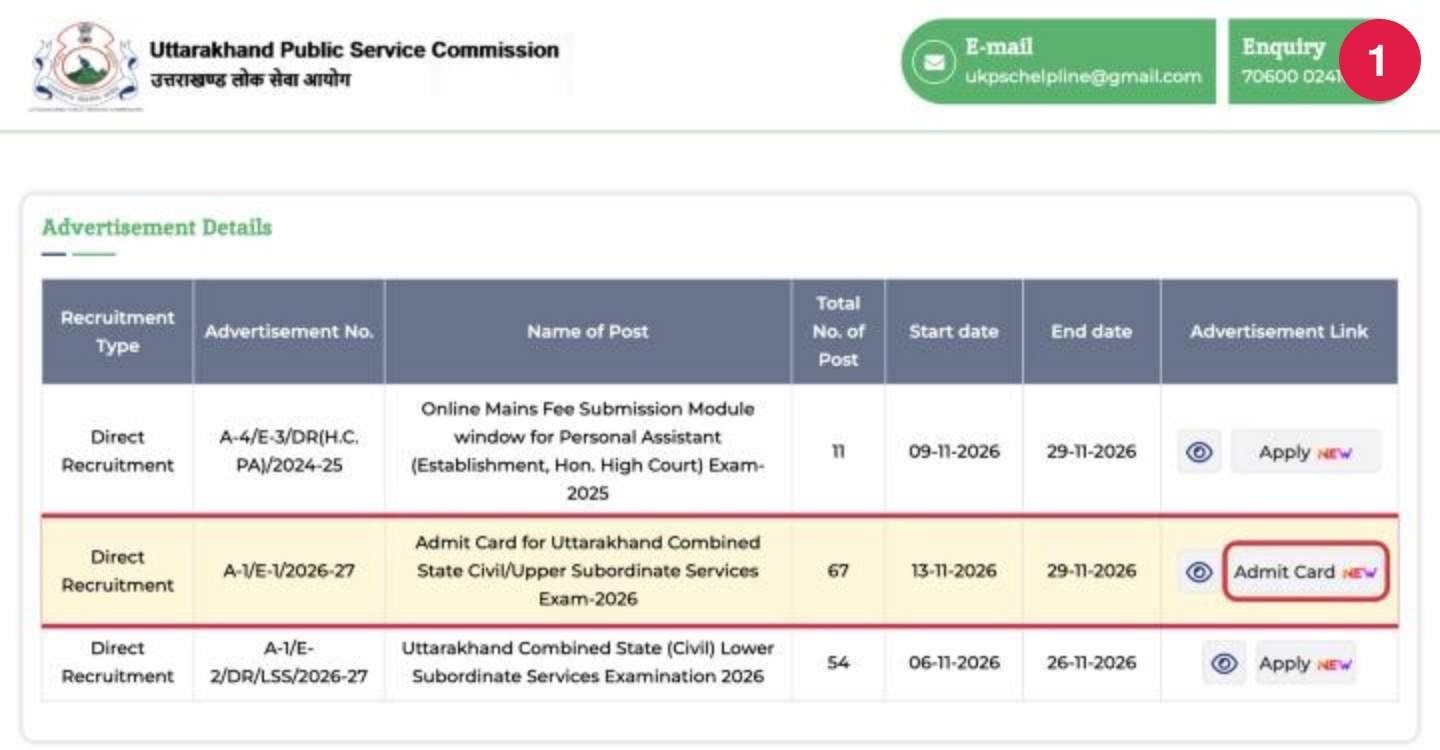
Go to pscuk.net.in, the commission’s application portal. You can also reach it from the “Admit Card” section of psc.uk.gov.in. In the Advertisement Details table, find the row A-1/E-1/2026-27, Admit Card for Uttarakhand Combined State Civil/Upper Subordinate Services Exam-2026 and click the Admit Card button in that row.
Step 2: Choose how you want to log in
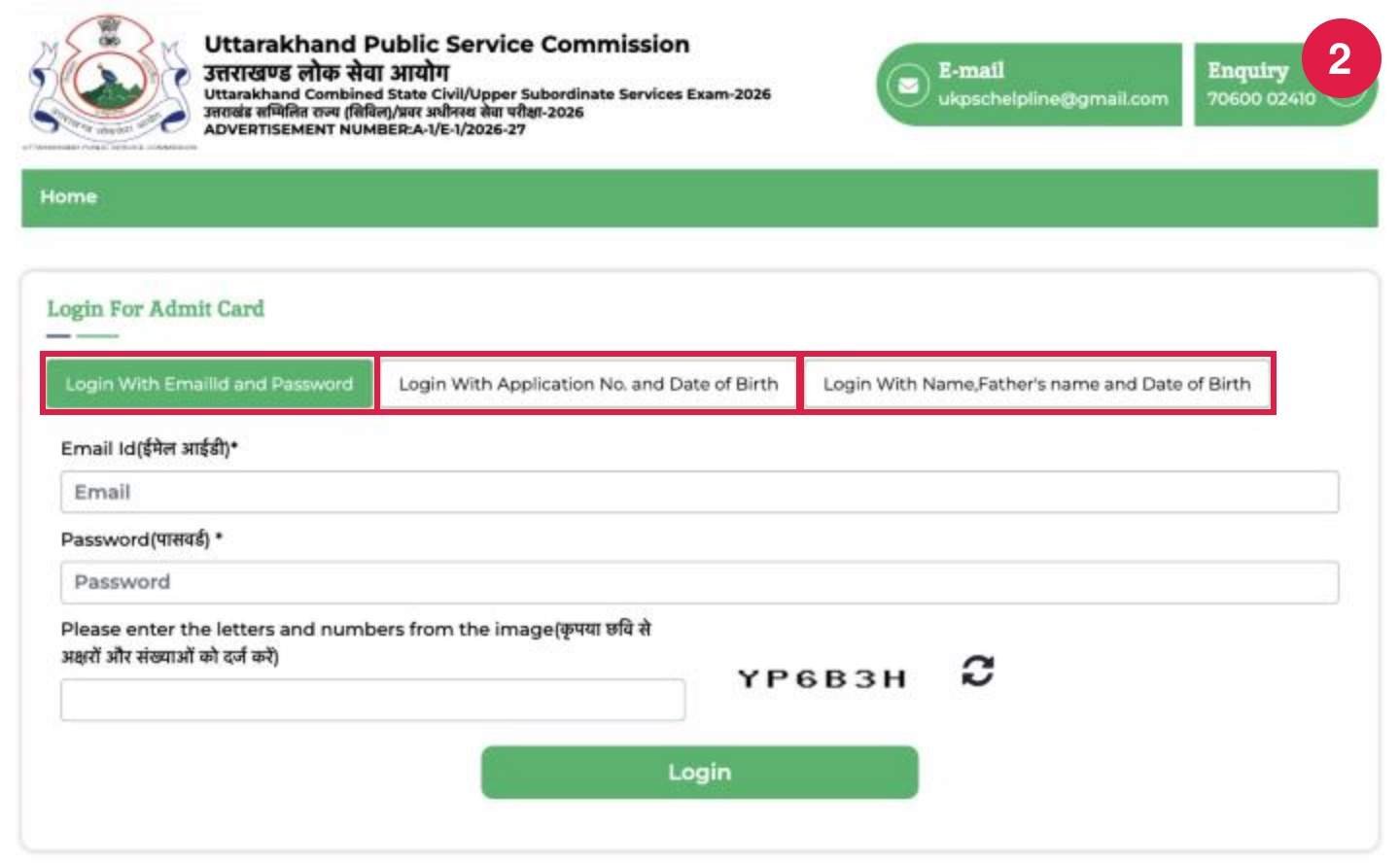
The “Login For Admit Card” page gives you three options. Pick whichever details you have handy: email ID and password; application number and date of birth; or name, father’s name and date of birth.
Step 3: Log in with Application Number and Date of Birth
This is the quickest option. Click Login With Application No. and Date of Birth, enter your application number and your date of birth in dd-mm-yyyy format, type the letters and numbers shown in the captcha image, and click Login. If you used the email option instead, enter your registered email ID and password in the first tab in the same way.
Step 4: Or log in with your Name, Father's Name and Date of Birth
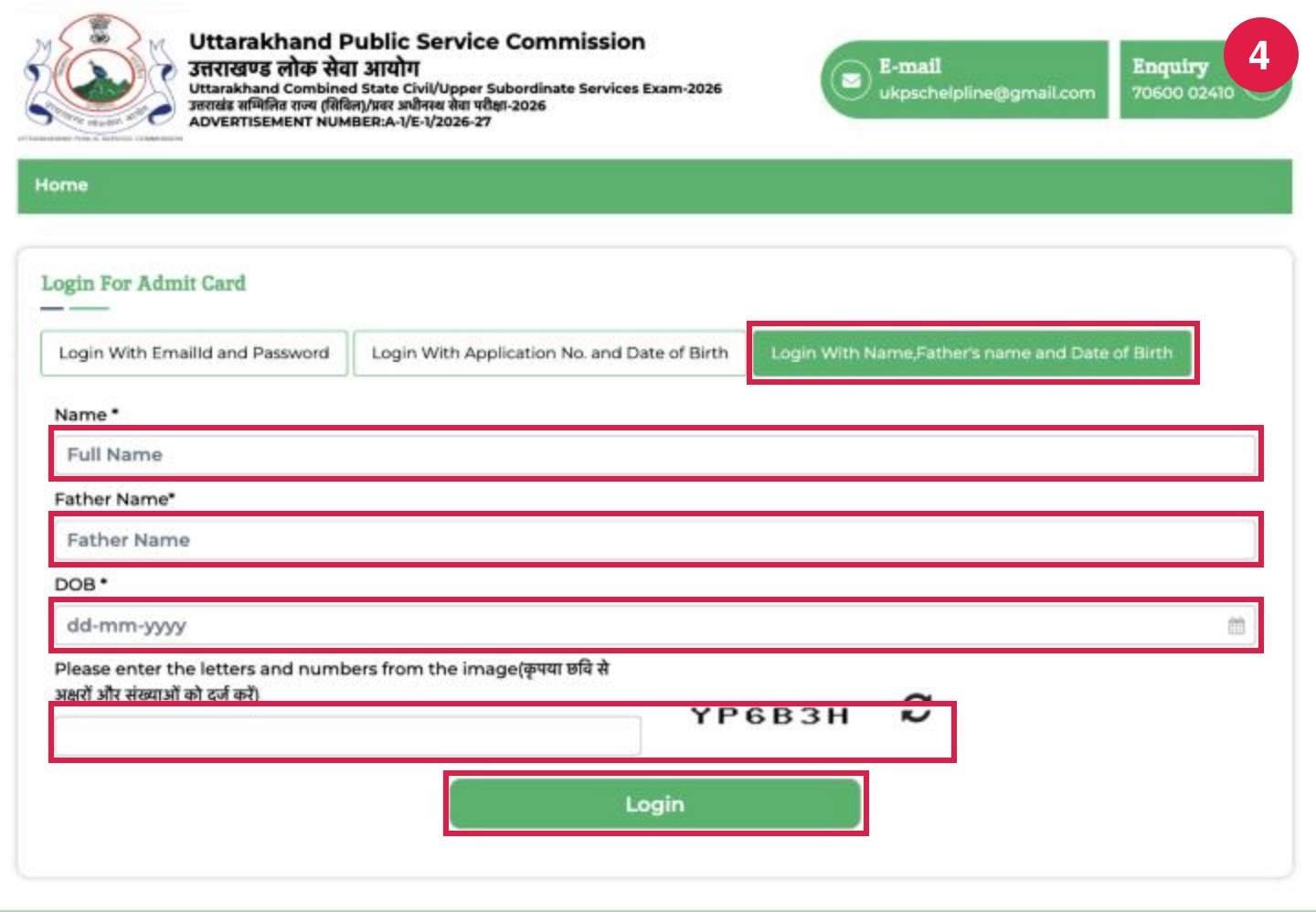
Lost your application number? Click Login With Name, Father’s name and Date of Birth and fill in your full name and your father’s name exactly as in your application form, then your date of birth, the captcha and Login.
Step 5: Download and print your admit card
After you log in, your admit card opens. Download the PDF, save a copy on your phone and take at least two clear printouts. We have not shown a real admit card here because it carries a candidate’s personal details.
Trouble logging in?
Enter your date of birth exactly in the dd-mm-yyyy format, as in your application.
For the name option, write your name and your father’s name exactly as you filled them in the form.
If your application number is not handy, check the confirmation e-mail or the printout of your online application.
The site can be slow in the last days before the exam. Try early in the morning or late at night if it does not load.
What to Check on Your Admit Card
Your name, father’s name, photograph and signature.
Your roll number and category.
The exam centre address and the city.
Both session timings, 10 am and 2 pm.
The instructions printed on the card. The commission’s notice asks every candidate to follow them.
If anything is wrong, contact the commission immediately. Do not wait until the exam week.
Important Points From the Commission's Notice
The commission’s notice of 6 November 2026 (PDF) also says:
No change of centre. Requests to change the exam centre will not be considered, so plan your travel to the city on your admit card now.
Scribe documents by 16 November 2026. Candidates with disabilities who claimed a scribe must send the required certificates to the commission’s office in Haridwar by post or another means by 16 November. E-mail is not accepted.
Commission-provided scribe: those who asked the commission for a scribe will get a centre in Haridwar and can meet the scribe at the commission’s office on 27 November 2026.
Where can I download the UKPSC Upper PCS admit card 2026?
On the commission’s application portal, pscuk.net.in, under advertisement A-1/E-1/2026-27. The link is also listed in the Admit Card section of psc.uk.gov.in.
Till when can I download the admit card?
The portal shows the download open from 13 November to 29 November 2026.
What do I need to log in?
Any one of these: your email ID and password; your application number and date of birth; or your full name, father’s name and date of birth. You also need to type a captcha.
Will the admit card be sent by post?
No. The commission has said admit cards will not be sent by post. You must download it yourself.
Can I change my exam centre?
No. The commission will not consider requests to change the exam centre.